
Tracking & Analytics
Overview
The Tracking & Analytics settings in Ortto allow you to seamlessly integrate third-party analytics and tracking tools with your landing pages and knowledge base articles.
This feature eliminates the need to manually add tracking scripts to individual pages, making it easier to maintain consistent tracking across all your customer-facing content while ensuring your analytics data flows correctly to your preferred platforms.
Available tracking integrations
Ortto supports integration with several major analytics and tracking platforms, each serving specific purposes in your marketing and analytics stack.
Meta Pixel
The Meta Pixel (formerly Facebook Pixel) enables you to track page views and conversions from your Ortto landing pages and knowledge base articles back to Meta's advertising platform. When enabled, you can measure the effectiveness of your Facebook and Instagram ad campaigns by tracking which visitors came from your ads.
LinkedIn Insight Tag
The LinkedIn Insight Tag allows you to send conversion data back to LinkedIn, helping you measure the performance of your LinkedIn advertising campaigns. By adding your LinkedIn Partner ID, you can track which visitors arrived from LinkedIn ads.
Google Analytics
Google Analytics integration enables comprehensive tracking of page views and user behavior on your landing pages and knowledge base articles. By adding your Measurement ID, you can collect detailed analytics data about visitor demographics, behavior patterns, traffic sources, and conversion paths.
Google Tag Manager
Google Tag Manager (GTM) provides the most flexible tracking solution by allowing you to manage multiple tracking tags through a single container. Instead of adding individual tracking codes, you add your GTM Container ID once, and then manage all your tracking tags (including Google Analytics, conversion pixels, remarketing tags, and custom tracking scripts) directly within Google Tag Manager.
This approach is ideal for customer that use multiple tracking tools or need to frequently add, modify, or remove tracking scripts without making changes to their Ortto configuration.
How tracking works
When you enable a tracking integration and provide the required ID, Ortto automatically injects the appropriate tracking script into the pages you've selected. The tracking script loads when visitors access your landing pages or knowledge base articles, sending data back to the respective analytics platform.
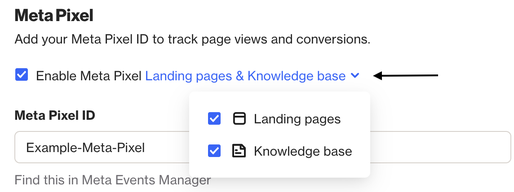
For each integration, you can choose whether to apply tracking to landing pages, knowledge base articles, or both, giving you granular control over where your tracking scripts are deployed.