
Talk activities and attributes
Overview
This page provides information about the default activities that are tracked in Ortto when contacts and agents interact through Ortto's support inbox, Talk. Activities are recorded at each stage of a conversation's lifecycle and can be used to trigger journeys, filter audiences, and report on support performance.
Talk system activities
Conversation tagged, Conversation untagged
These activities are recorded when a tag is applied to or removed from a conversation by an agent.
Attribute | Field type | Description | Merge tag |
|---|---|---|---|
Tagged by / Untagged by | Text | The name of the agent who applied or removed the tag. |
|
ID | ID | The ID for the conversation. |
|
Conversation number | Integer | The sequential number assigned to the conversation. |
|
Subject | Text | The subject line of the conversation. |
|
Tag IDs | ID | The IDs of the tags applied to or removed from the conversation. |
|
Tags | Text list | The names of the tags applied to or removed from the conversation. |
|
Source | Text | The source through which the conversation was initiated. |
|
Team | Text | The name of the team the conversation was assigned to. |
|
Assignee | Text | The name of the agent the conversation was assigned to. |
|
Channel | Text | The channel through which the conversation was received. |
|
Country | Geo | The country of the contact associated with the conversation. |
|
Region | Geo | The region of the contact associated with the conversation. |
|
City | Geo | The city of the contact associated with the conversation. |
|
Timezone | Single select | The timezone of the contact associated with the conversation. |
|
Conversation opened, Conversation reopened
These activities are recorded when a new conversation is started by a contact, or when a previously closed conversation is reopened by an agent or contact.
Attribute | Field type | Description | Merge tag |
|---|---|---|---|
Reopened by agent | Text | The name of the agent who reopened the conversation. Only present on the Conversation reopened activity. |
|
ID | ID | The ID for the conversation. |
|
Conversation number | Integer | The sequential number assigned to the conversation. |
|
Subject | Text | The subject line of the conversation. |
|
Tag IDs | ID | The IDs of any tags applied to the conversation. |
|
Tags | Text list | The names of any tags applied to the conversation. |
|
Source | Text | The source through which the conversation was initiated. |
|
Secure | Boolean | Whether the conversation was initiated over a secure connection. Only present on the Conversation opened activity. |
|
Widget name | Text | The name of the chat widget used to start the conversation. |
|
Team | Text | The name of the team the conversation was assigned to. |
|
Assignee | Text | The name of the agent the conversation was assigned to. |
|
Channel | Text | The channel through which the conversation was received. |
|
Inbox email | The inbox email address associated with the conversation. |
| |
Message | Text | The initial message sent by the contact. |
|
Start page | URL | The URL of the page the contact was on when the conversation began. |
|
Opened at | Time and date | The time at which the conversation was opened. Only present on the Conversation reopened activity. |
|
Country | Geo | The country of the contact associated with the conversation. |
|
Region | Geo | The region of the contact associated with the conversation. |
|
City | Geo | The city of the contact associated with the conversation. |
|
Timezone | Single select | The timezone of the contact associated with the conversation. |
|
Conversation assigned
This activity is recorded when a conversation is assigned to an agent or team.
Attribute | Field type | Description | Merge tag |
|---|---|---|---|
Assigned by | Text | The name of the agent who performed the assignment. |
|
ID | ID | The ID for the conversation. |
|
Conversation number | Integer | The sequential number assigned to the conversation. |
|
Subject | Text | The subject line of the conversation. |
|
Tag IDs | ID | The IDs of any tags applied to the conversation. |
|
Tags | Text list | The names of any tags applied to the conversation. |
|
Source | Text | The source through which the conversation was initiated. |
|
Team | Text | The name of the team the conversation is assigned to. |
|
Assignee | Text | The name of the agent the conversation is assigned to. |
|
First response at | Time and date | The time at which the first response was sent in the conversation. |
|
First response time in minutes | Integer | The time elapsed from conversation open to first response, in minutes. |
|
First response time in minutes during office hours | Integer | The first response time in minutes, counting only office hours. |
|
Channel | Text | The channel through which the conversation was received. |
|
Opened at | Time and date | The time at which the conversation was opened. |
|
Country | Geo | The country of the contact associated with the conversation. |
|
Region | Geo | The region of the contact associated with the conversation. |
|
City | Geo | The city of the contact associated with the conversation. |
|
Timezone | Single select | The timezone of the contact associated with the conversation. |
|
Conversation snoozed
This activity is recorded when an agent snoozes a conversation to follow up at a later time.
Attribute | Field type | Description | Merge tag |
|---|---|---|---|
Snoozed by | Text | The name of the agent who snoozed the conversation. |
|
Snoozed until | Time and date | The date and time at which the conversation is scheduled to reactivate. |
|
ID | ID | The ID for the conversation. |
|
Conversation number | Integer | The sequential number assigned to the conversation. |
|
Subject | Text | The subject line of the conversation. |
|
Tag IDs | ID | The IDs of any tags applied to the conversation. |
|
Tags | Text list | The names of any tags applied to the conversation. |
|
Source | Text | The source through which the conversation was initiated. |
|
Team | Text | The name of the team the conversation was assigned to. |
|
Assignee | Text | The name of the agent the conversation was assigned to. |
|
Channel | Text | The channel through which the conversation was received. |
|
Opened at | Time and date | The time at which the conversation was opened. |
|
Country | Geo | The country of the contact associated with the conversation. |
|
Region | Geo | The region of the contact associated with the conversation. |
|
City | Geo | The city of the contact associated with the conversation. |
|
Timezone | Single select | The timezone of the contact associated with the conversation. |
|
Conversation updated
This activity is recorded when a reply is sent or an update is made to a conversation.
Attribute | Field type | Description | Merge tag |
|---|---|---|---|
ID | ID | The ID for the conversation. |
|
Conversation number | Integer | The sequential number assigned to the conversation. |
|
Replying agent | Text | The name of the agent who sent the reply or update. |
|
Subject | Text | The subject line of the conversation. |
|
Tag IDs | ID | The IDs of any tags applied to the conversation. |
|
Tags | Text list | The names of any tags applied to the conversation. |
|
Source | Text | The source through which the conversation was initiated. |
|
Team | Text | The name of the team the conversation was assigned to. |
|
Assignee | Text | The name of the agent the conversation was assigned to. |
|
Channel | Text | The channel through which the conversation was received. |
|
Opened at | Time and date | The time at which the conversation was opened. |
|
Number of replies | Integer | The number of replies sent in this update. |
|
Total number of replies | Integer | The cumulative total number of replies across the entire conversation. |
|
Total number of exchanges | Integer | The cumulative total number of back-and-forth exchanges across the entire conversation. |
|
Country | Geo | The country of the contact associated with the conversation. |
|
Region | Geo | The region of the contact associated with the conversation. |
|
City | Geo | The city of the contact associated with the conversation. |
|
Timezone | Single select | The timezone of the contact associated with the conversation. |
|
Conversation closed
This activity is recorded when a conversation is closed by an agent.
Attribute | Field type | Description | Merge tag |
|---|---|---|---|
Closed by | Text | The name of the agent who closed the conversation. |
|
ID | ID | The ID for the conversation. |
|
Conversation number | Integer | The sequential number assigned to the conversation. |
|
Start page | URL | The URL of the page the contact was on when the conversation began. |
|
Subject | Text | The subject line of the conversation. |
|
Tag IDs | ID | The IDs of any tags applied to the conversation. |
|
Tags | Text list | The names of any tags applied to the conversation. |
|
Source | Text | The source through which the conversation was initiated. |
|
Team | Text | The name of the team the conversation was assigned to. |
|
Assignee | Text | The name of the agent the conversation was assigned to. |
|
Channel | Text | The channel through which the conversation was received. |
|
First response at | Time and date | The time at which the first response was sent. |
|
First response time in minutes | Integer | The time elapsed from conversation open to first response, in minutes. |
|
First response time in minutes during office hours | Integer | The first response time in minutes, counting only office hours. |
|
Conversation time in minutes | Integer | The total duration of the conversation, in minutes. |
|
Conversation time in minutes during office hours | Integer | The total conversation duration counting only office hours. |
|
Number of replies | Integer | The number of replies sent during the conversation. |
|
Number of exchanges | Integer | The number of back-and-forth exchanges in the conversation. |
|
Voice call | Boolean | Whether the conversation included a voice call. |
|
Agent screen share | Boolean | Whether the agent shared their screen during the conversation. |
|
User screen share | Boolean | Whether the contact shared their screen during the conversation. |
|
Voice call length in minutes | Integer | The duration of the voice call, in minutes. |
|
Screen share length in minutes | Integer | The duration of the screen share session, in minutes. |
|
Opened at | Time and date | The time at which the conversation was opened. |
|
Country | Geo | The country of the contact associated with the conversation. |
|
Region | Geo | The region of the contact associated with the conversation. |
|
City | Geo | The city of the contact associated with the conversation. |
|
Timezone | Single select | The timezone of the contact associated with the conversation. |
|
Conversation rated
This activity is recorded when a contact submits a satisfaction rating after a conversation is closed.
Attribute | Field type | Description | Merge tag |
|---|---|---|---|
Rating | Integer | The numerical satisfaction rating submitted by the contact. |
|
Rating comment | Text | Any written comment submitted alongside the rating. |
|
Closed by | Text | The name of the agent who closed the conversation. |
|
ID | ID | The ID for the conversation. |
|
Conversation number | Integer | The sequential number assigned to the conversation. |
|
Subject | Text | The subject line of the conversation. |
|
Tag IDs | ID | The IDs of any tags applied to the conversation. |
|
Tags | Text list | The names of any tags applied to the conversation. |
|
Source | Text | The source through which the conversation was initiated. |
|
Team | Text | The name of the team the conversation was assigned to. |
|
Assignee | Text | The name of the agent the conversation was assigned to. |
|
Channel | Text | The channel through which the conversation was received. |
|
First response at | Time and date | The time at which the first response was sent. |
|
First response time in minutes | Integer | The time elapsed from conversation open to first response, in minutes. |
|
First response time in minutes during office hours | Integer | The first response time in minutes, counting only office hours. |
|
Conversation time in minutes during office hours | Integer | The total conversation duration counting only office hours. |
|
Conversation time in minutes | Integer | The total duration of the conversation, in minutes. |
|
Number of replies | Integer | The number of replies sent during the conversation. |
|
Number of exchanges | Integer | The number of back-and-forth exchanges in the conversation. |
|
Voice call | Boolean | Whether the conversation included a voice call. |
|
Agent screen share | Boolean | Whether the agent shared their screen during the conversation. |
|
User screen share | Boolean | Whether the contact shared their screen during the conversation. |
|
Voice call length in minutes | Integer | The duration of the voice call, in minutes. |
|
Screen share length in minutes | Integer | The duration of the screen share session, in minutes. |
|
Opened at | Time and date | The time at which the conversation was opened. |
|
Closed at | Time and date | The time at which the conversation was closed. |
|
Country | Geo | The country of the contact associated with the conversation. |
|
Region | Geo | The region of the contact associated with the conversation. |
|
City | Geo | The city of the contact associated with the conversation. |
|
Timezone | Single select | The timezone of the contact associated with the conversation. |
|
Conversation marked as spam
This activity is recorded when a conversation is marked as spam by an agent.
Attribute | Field type | Description | Merge tag |
|---|---|---|---|
Marked by | Text | The name of the agent who marked the conversation as spam. |
|
Opened at | Time and date | The time at which the conversation was opened. |
|
ID | ID | The ID for the conversation. |
|
Conversation number | Integer | The sequential number assigned to the conversation. |
|
Team | Text | The name of the team the conversation was assigned to. |
|
Assignee | Text | The name of the agent the conversation was assigned to. |
|
Subject | Text | The subject line of the conversation. |
|
Tag IDs | ID | The IDs of any tags applied to the conversation. |
|
Tags | Text list | The names of any tags applied to the conversation. |
|
Source | Text | The source through which the conversation was initiated. |
|
Channel | Text | The channel through which the conversation was received. |
|
Country | Geo | The country of the contact associated with the conversation. |
|
Region | Geo | The region of the contact associated with the conversation. |
|
City | Geo | The city of the contact associated with the conversation. |
|
Timezone | Single select | The timezone of the contact associated with the conversation. |
|
Using Talk activity merge tags for alerts
Talk activity merge tags can be used to build real-time internal alerts that route key conversation details directly to your team - via Slack or notification email - as contacts move through a journey.
Slack alerts
You can send automated Slack messages to a channel of your choice whenever a Talk activity occurs, using merge tags to populate conversation details dynamically.
Prerequisites:
Ensure Slack is connected as a data source in your Ortto account before setting up this action.
Set up a Slack alert using Talk activity merge tags:
- Navigate to Marketing > Campaigns and open your journey.
- Select + > Action > Send Slack message.
- Select the Slack channel you want to send the alert to.
- Compose your message using Talk activity merge tags to include relevant conversation details.
- Select Create.
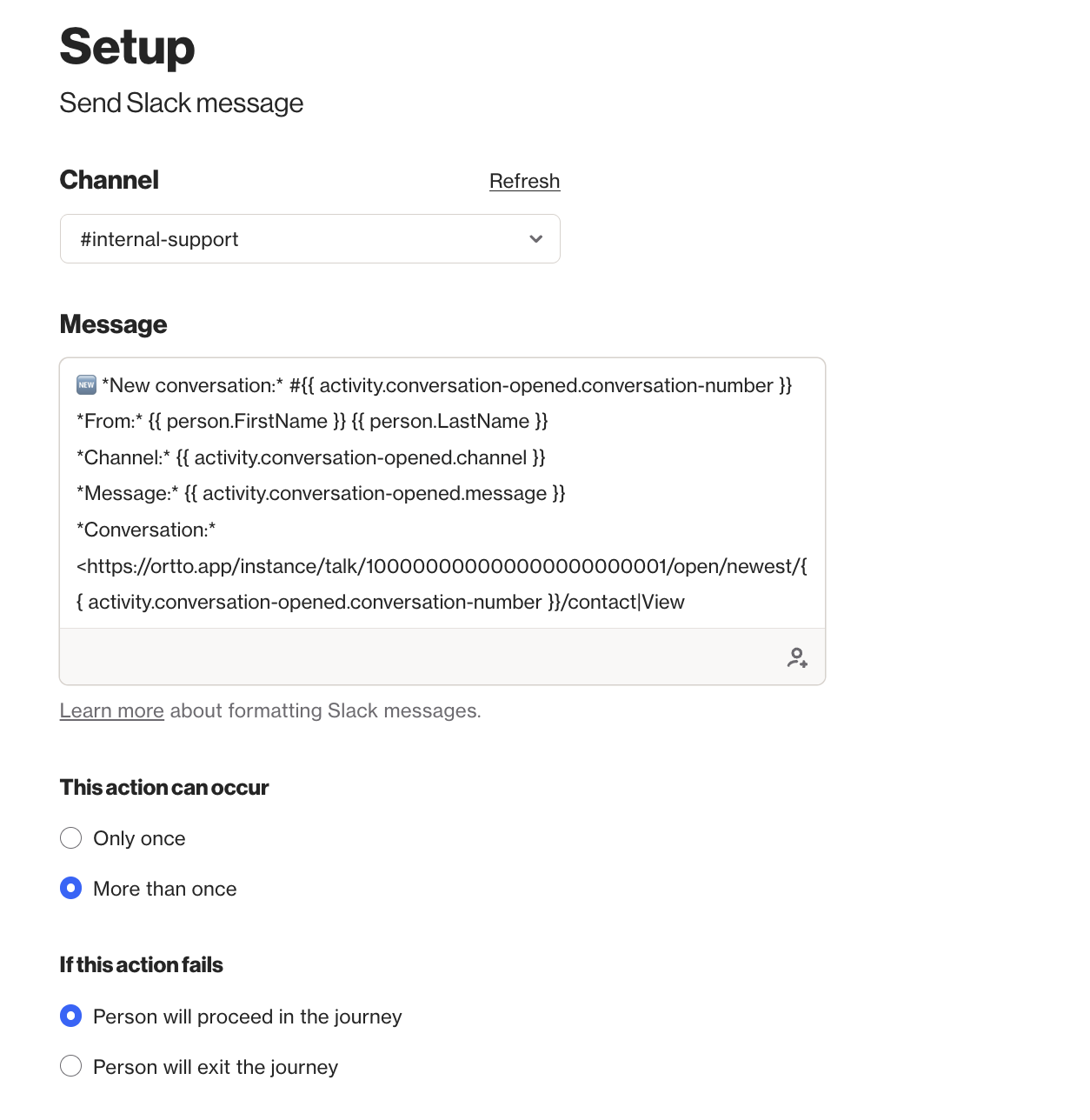
EX: A journey triggered by the Conversation opened occurs activity could send the following alert to an #internal-support channel:
 🆕 *New conversation:* #{{ activity.conversation-opened.conversation-number }}
*From:* {{ person.first-name }} {{ person.last-name }}
*Channel:* {{ activity.conversation-opened.channel }}
*Message:* {{ activity.conversation-opened.message }}
*Conversation:* <https://ortto.app/instance/talk/100000000000000000000001/open/newest/{{ activity.conversation-opened.conversation-number }}/contact|View Conversation>
Note: Replace instance in the View URL with your account's instance name.
Formatting tips:
- Use
*your text*for bold and_your text_for italic text. - To create a hyperlink with custom display text, use the format
<URL|link text>. This works with merge tags too, for example:<https://ortto.app/instance/talk/100000000000000000000001/open/newest/{{ activity.conversation-opened.conversation-number }}/contact|View conversation>. - To mention a team member, copy their member ID from their Slack profile and insert it as
<@MEMBERID>. - Add a blank line at the end of your message to push the auto-generated View contact link to a new line.
Learn more about sending messages to Slack and formatting a Slack message.
Notification email alerts
The notification email action lets you send an internal email to users within your Ortto account or connected domain whenever a Talk activity occurs. This is useful for alerting specific team members about conversation events such as a new assignment, a low satisfaction rating, or a reopened conversation.
Set up a notification email using Talk activity merge tags:
- Navigate to Marketing > Campaigns and open your journey.
- Select + > Action > Notification email.
- Enter the recipient email address(es) for the internal alert.
- Compose your subject line and message body using Talk activity merge tags.
- Select Create.
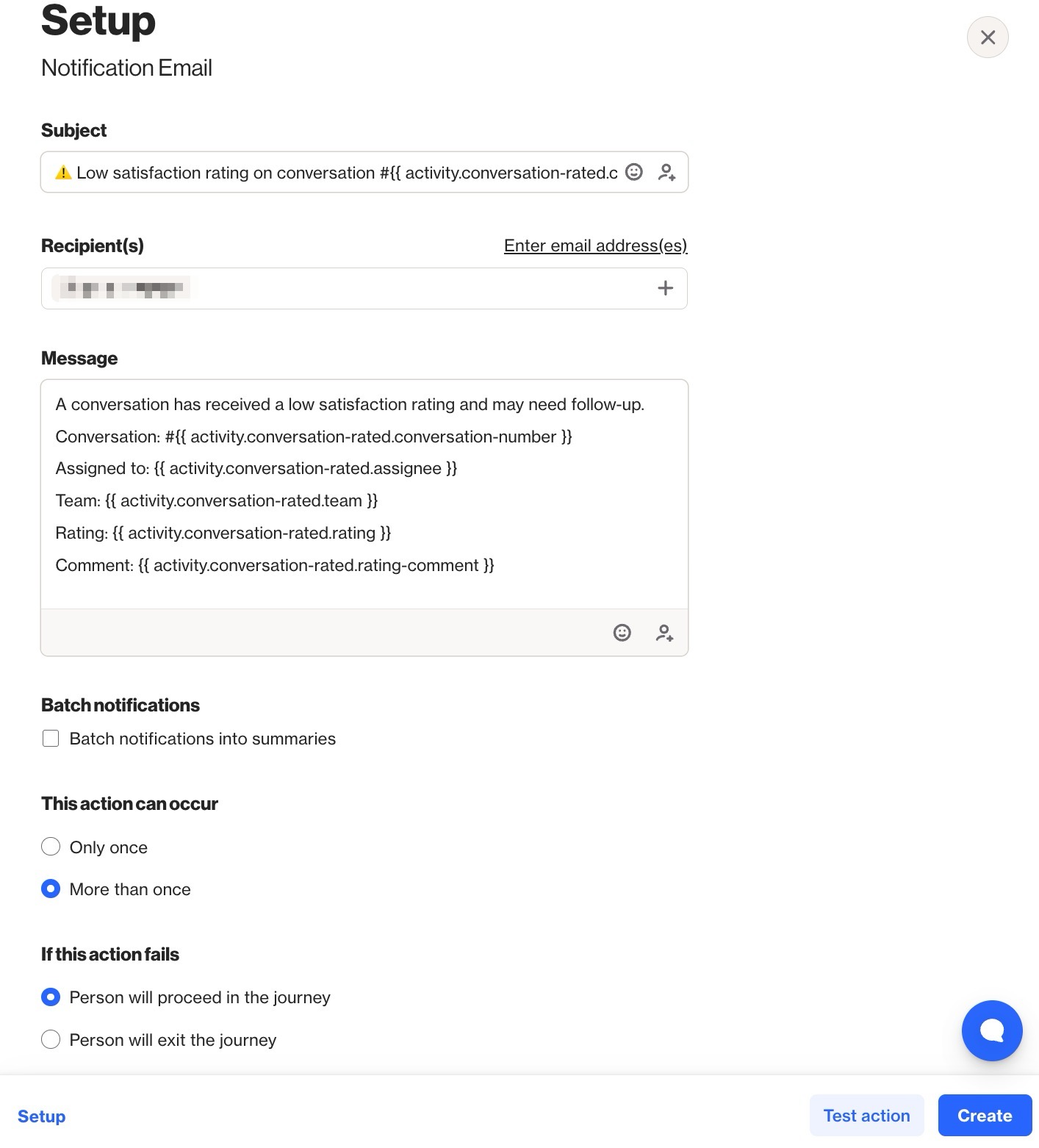
EX: A journey triggered by the Conversation rated occurs activity with a low rating could send the following alert:
 Subject: ⚠️ Low satisfaction rating on conversation #{{ activity.conversation-rated.conversation-number }}

A conversation has received a low satisfaction rating & may need follow-up.

Conversation: #{{ activity.conversation-rated.conversation-number }}
Assigned to: {{ activity.conversation-rated.assignee }}
Team: {{ activity.conversation-rated.team }}
Rating: {{ activity.conversation-rated.rating }}
Comment: {{ activity.conversation-rated.rating-comment }}
Important considerations:
- A notification is sent each time a contact passes through the shape. Notifications are not consolidated across multiple contacts by default.
- To group multiple notifications into a single scheduled email, enable the Batch notifications option and choose an hourly, daily, or weekly delivery schedule.
- This action has a rate limit of 100 actions per minute and is not suited for high-volume sending in short timeframes.
- The From Name will always appear as Ortto, and the From address will follow the format:
[Ortto account name]@[defaultdomain].
Learn more about notification emails.