
Delete a business field (delete)
The delete Ortto endpoint of the business-fields entity is used to retrieve a specific custom business field in Ortto’s customer data platform (CDP).
This page provides descriptions of this endpoint’s:
- the response payload.
HTTP method and request resources
Delete Business fields endpoint
DELETE https://api.ap3api.com/v1/business-fields/delete
NOTE: Ortto customers who have their instance region set to Australia or Europe will need to use specific service endpoints relative to the region:
- Australia: https://api.au.ap3api.com/
- Europe: https://api.eu.ap3api.com/
For example: https://api.eu.ap3api.com/v1/<entity/endpoint>
All other Ortto users will use the default service endpoint (https://api.ap3api.com/).
Path and query parameters
This endpoint takes no additional path and/or query parameters.
Headers
This endpoint requires a custom API key and content type (application/json for the request body) in the header of the request:
X-Api-Key: CUSTOM-PRIVATE-API-KEYContent-Type: application/json
Request body
The request body consists of a JSON object whose valid elements are listed in the request below.
The following JSON object is an example of field and object data that Ortto can recognize to delete a business field in your Ortto account’s CDP.
Example delete business field payload from Ortto’s CDP
json {

  "field_id": "str:$bc:website"

}
IMPORTANT: Deleting a business field is a permanent action and cannot be undone. Ensure the correct field_id is included in the payload.
TIP: The field_id can be retrieved via this endpoint, or it can also be found in-app on the Business profile page.
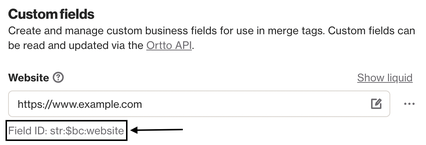
Learn more about business fields.
Response payload
There’s no response body for this request. Ortto will simply return a 200 successful response, or an error indication if something goes wrong.