
Update a business field (update)
The update Ortto endpoint of the business-fields entity is used to retrieve a specific custom business field in Ortto’s customer data platform (CDP).
This page provides descriptions of this endpoint’s:
- the response payload.
HTTP method and request resources
Update Business fields endpoint
PUT https://api.ap3api.com/v1/business-fields/update
NOTE: Ortto customers who have their instance region set to Australia or Europe will need to use specific service endpoints relative to the region:
- Australia: https://api.au.ap3api.com/
- Europe: https://api.eu.ap3api.com/
For example: https://api.eu.ap3api.com/v1/<entity/endpoint>
All other Ortto users will use the default service endpoint (https://api.ap3api.com/).
Path and query parameters
This endpoint takes no additional path and/or query parameters.
Headers
This endpoint requires a custom API key and content type (application/json for the request body) in the header of the request:
X-Api-Key: CUSTOM-PRIVATE-API-KEYContent-Type: application/json
Request body
The request body consists of a JSON object whose valid elements are listed in the table below.
The following JSON object is an example of field and object data that Ortto can recognize to create a business field in your Ortto account’s CDP.
Example update business field payload from Ortto’s CDP
json {

  "field_id": "str:$bc:website",
  "value": "https://www.new-value-example.com"

}
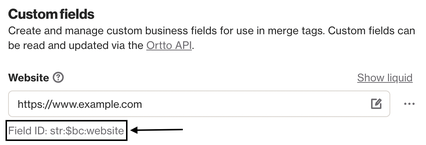
TIP: The field_id can be retrieved via this endpoint, or it can also be found in-app on the Business profile page.
Learn more about business fields.
Response payload
The response payload consists of a JSON object with the elements listed in the table below.
The following JSON object is an example of the business field data that Ortto retrieves from your Ortto account’s CDP after a request to this endpoint.
Example update business field response payload from Ortto’s CDP
json {
    "str:$bc:website": {
        "field_id": "str:$bc:website",
        "name": "Website",
        "liquid_name": "business.custom.website",
        "display_type": "link",
        "value": "https://www.new-value-example.com",
        "is_system": false,
        "read_only": false
}
NOTE: In the response to this request, you may also receive additional fields from your Business profile page, such as company name, address, and other related fields.
Response payload elements
The following table lists all elements (arrays, objects, or fields) in the response from a request to this endpoint.
The response is an array of field objects, the elements of the field object is included below.
Element | Type | Description | ||
|---|---|---|---|---|
|
| The identifier for the field name in Ortto’s custom field ID format. | ||
|
| The name specified for the field when it was created or the system-assigned name. | ||
|
| The Liquid language tag for the field. | ||
|
| The name of the field type. See a list of field types under Request body in Create a custom field (create). | ||
|
| The value currently assigned to this field. | ||
|
| Whether this field is a system field (includes social links). If false, the field is custom. | ||
|
| If this field can be updated via the API. If false, the field can only be updated in the Ortto app. | ||