
Retrieve one report (get)
Overview
The get Ortto endpoint of the reports entity is used to retrieve one article within Ortto’s customer data platform (CDP).
NOTE: You can also retrieve a list of reports by referring to the v1/reports/list endpoint in retrieve a list of reports.
This page provides descriptions of this endpoint's:
- The response payload.
HTTP method and request resource
POST https://api.ap3api.com/v1/reports/get
NOTE: Ortto customers who have their instance region set to Australia or Europe will need to use specific service endpoints relative to the region:
- Australia: https://api.au.ap3api.com/
- Europe: https://api.eu.ap3api.com/
For example: https://api.eu.ap3api.com/v1/<entity/endpoint>
All other Ortto users will use the default service endpoint (https://api.ap3api.com/).
Path and query parameters
This endpoint takes no additional path and/or query parameters.
Headers
This endpoint requires a custom API key and content type (application/json for the request body) in the header of the request:
X-Api-Key: CUSTOM-PRIVATE-API-KEYContent-Type: application/json
Request body
The request body consists of a JSON object whose valid elements are listed in the table below.
Example get one report request body from Ortto's CDP.
json {
  "report_id": "630c302b6b42a00cea949e7d"
}
Valid request body elements
The following table lists all valid, optional request body elements that are available at this endpoint.
Element | Type | Description |
|---|---|---|
|
| A string identifying the report ID by its unique ID number. |
|
| Set to Using A forced refresh can only occur if the last saved version of the report is more than 30 seconds old. If omitted, this value defaults to |
Response payload
The following JSON object is an example of a report call that Ortto retrieves from your Ortto account's CDP after a request to this endpoint.
json {
  "id": "630c302b6b42a00cea949e7d",
  "instance_id": "professionalpete",
  "type": "dynamic",
  "object_type": "contact",
  "chart_type": "table",
  "image_url": null,
  "created_by_id": "628ab642c6fc743e4750e289",
  "created_by_name": "",
  "created_at": "2022-08-29T03:19:07.91Z",
  "last_edited": "2025-11-25T05:15:50.063Z",
  "edited_by_id": "628ab642c6fc743e4750e289",
  "edited_by_name": "Joe Doyle",
  "last_refreshed": "2026-01-09T02:23:41.249Z",
  "data_stored_since": "2021-06-24T00:43:09.678Z",
  "name": "Campaign summary",
  "snapshot": {
    "rows": [
      {
        "key": "Testing",
        "values": [
          1,
          1000,
          0,
          0,
          0
        ]
      },
      {
        "key": "BCC Testing With Link Clicks",
        "values": [
          1,
          1000,
          1000,
          0,
          0
        ]
      },
      {
        "key": "BCC Testing",
        "values": [
          1,
          1000,
          0,
          0,
          0
        ]
      },
      {
        "key": "Account Journey (Test From Scratch)",
        "values": [
          1,
          1000,
          0,
          0,
          0
        ]
      },
      {
        "key": "Schedule Calendar Testing",
        "values": [
          1,
          0,
          0,
          0,
          0
        ]
      }
    ],
    "legend": [
      {
        "label": "Campaign name",
        "type": "text"
      },
      {
        "label": "Received",
        "type": "integer"
      },
      {
        "label": "Open rate",
        "type": "percent"
      },
      {
        "label": "Click rate",
        "type": "percent"
      },
      {
        "label": "Reactions",
        "type": "integer"
      },
      {
        "label": "Bounced email",
        "type": "integer"
      }
    ]
  },
  "time_precision": "days",
  "conversion_window": "entire-range",
  "timezone": "Australia/Sydney",
  "timeframe": {
    "type": "last-year",
    "custom_from": {
      "year": 0,
      "month": 0,
      "day": 0,
      "timezone": "UTC"
    },
    "custom_to": {
      "year": 0,
      "month": 0,
      "day": 0,
      "timezone": "UTC"
    }
  },
  "number_display_type": "percent",
  "refresh_rate": "",
  "from": "2021-05-24T14:00:00Z",
  "to": "2021-06-24T13:59:59Z",
  "display_values": false,
  "trendline": false,
  "stack_values": false,
  "is_cumulative": false,
  "suppression_filter": false,
  "previous_period": false,
  "associated_by_attribute_id": "",
  "table_group_by_attribute_id": "str::cn",
  "table_group_by_label": "Campaign name",
  "table_group_by_display_type": "text",
  "table_group_by_precision": "",
  "is_table_group_by_contact_field": false,
  "group_empty_as_unknown": false,
  "sort_by": 1,
  "sort": "desc",
  "columns": [
    {
      "title": "Campaign name",
      "type": "text",
      "width": 216
    },
    {
      "title": "Received",
      "type": "integer",
      "width": 111
    },
    …
  ],
  "pie_results": 10,
  "activities": [
    {
      "selected_attributes": [
        {
          "id": "tme::time",
          "title": "Time",
          "name": "Time",
          "display_type": "timestring",
          "special": "time",
          "precision": "days",
          "format": "MM:DD"
        }
      ],
      "field_id": "act::r",
      "title": "Received email",
      "label": "Received",
      "icon": "",
      "aggregate_by_attribute_id": "",
      "aggregate_by_attribute_type": "",
      "associated_by_attribute_id": "",
      "group_by_attribute_id": "",
      "group_by_attribute_type": "",
      "is_group_by_contact_field": false,
      "is_unique_by_group_by": false,
      "aggregate_operation": "count",
      "ratio_with_activity_display_type": "percent",
      "ratio_with_activity_id": "",
      "ratio_aggregate_by_attribute_id": "",
      "ratio_aggregate_by_attribute_type": "",
      "ratio_associated_by_attribute_id": "",
      "ratio_aggregate_operation": "count",
      "nps_show_response_values": false
    },
    {
      "selected_attributes": [
        {
          "id": "tme::time",
          "title": "Time",
          "name": "Time",
          "display_type": "timestring",
          "special": "time",
          "precision": "days",
          "format": "MM:DD"
        }
      ],
      "field_id": "act::o",
      "title": "Opened email",
      "label": "Open rate",
      "icon": "",
      "aggregate_by_attribute_id": "",
      "aggregate_by_attribute_type": "",
      "associated_by_attribute_id": "idt::ei",
      "group_by_attribute_id": "",
      "group_by_attribute_type": "",
      "is_group_by_contact_field": false,
      "is_unique_by_group_by": false,
      "aggregate_operation": "count-unique",
      "ratio_with_activity_display_type": "percent",
      "ratio_with_activity_id": "act::r",
      "ratio_aggregate_by_attribute_id": "",
      "ratio_aggregate_by_attribute_type": "",
      "ratio_associated_by_attribute_id": "idt::ei",
      "ratio_aggregate_operation": "count-unique",
      "nps_show_response_values": false
    },
    {
      "selected_attributes": [
        {
          "id": "tme::time",
          "title": "Time",
          "name": "Time",
          "display_type": "timestring",
          "special": "time",
          "precision": "days",
          "format": "MM:DD"
        }
      ],
      "field_id": "act::c",
      "title": "Clicked email",
      "label": "Click rate",
      "icon": "",
      "aggregate_by_attribute_id": "",
      "aggregate_by_attribute_type": "",
      "associated_by_attribute_id": "idt::ei",
      "group_by_attribute_id": "",
      "group_by_attribute_type": "",
      "is_group_by_contact_field": false,
      "is_unique_by_group_by": false,
      "aggregate_operation": "count-unique",
      "ratio_with_activity_display_type": "percent",
      "ratio_with_activity_id": "act::r",
      "ratio_aggregate_by_attribute_id": "",
      "ratio_aggregate_by_attribute_type": "",
      "ratio_associated_by_attribute_id": "idt::ei",
      "ratio_aggregate_operation": "count-unique",
      "nps_show_response_values": false
    },
    {
      "selected_attributes": [
        {
          "id": "tme::time",
          "title": "Time",
          "name": "Time",
          "display_type": "timestring",
          "special": "time",
          "precision": "days",
          "format": "MM:DD"
        }
      ],
      "field_id": "act::rt",
      "title": "Reacted to email",
      "label": "Reactions",
      "icon": "",
      "aggregate_by_attribute_id": "",
      "aggregate_by_attribute_type": "",
      "associated_by_attribute_id": "",
      "group_by_attribute_id": "",
      "group_by_attribute_type": "",
      "is_group_by_contact_field": false,
      "is_unique_by_group_by": false,
      "aggregate_operation": "count",
      "ratio_with_activity_display_type": "percent",
      "ratio_with_activity_id": "",
      "ratio_aggregate_by_attribute_id": "",
      "ratio_aggregate_by_attribute_type": "",
      "ratio_associated_by_attribute_id": "",
      "ratio_aggregate_operation": "count",
      "nps_show_response_values": false
    },
    {
      "selected_attributes": [
        {
          "id": "tme::time",
          "title": "Time",
          "name": "Time",
          "display_type": "timestring",
          "special": "time",
          "precision": "days",
          "format": "MM:DD"
        }
      ],
      "field_id": "act::b",
      "title": "Bounced email",
      "label": "Bounced email",
      "icon": "bounced-icon",
      "aggregate_by_attribute_id": "",
      "aggregate_by_attribute_type": "",
      "associated_by_attribute_id": "",
      "group_by_attribute_id": "",
      "group_by_attribute_type": "",
      "is_group_by_contact_field": false,
      "is_unique_by_group_by": false,
      "aggregate_operation": "count",
      "ratio_with_activity_display_type": "percent",
      "ratio_with_activity_id": "",
      "ratio_aggregate_by_attribute_id": "",
      "ratio_aggregate_by_attribute_type": "",
      "ratio_associated_by_attribute_id": "",
      "ratio_aggregate_operation": "count",
      "nps_show_response_values": false
    }
  ],
  "data_change_on_sort": false
}
How to find report IDs
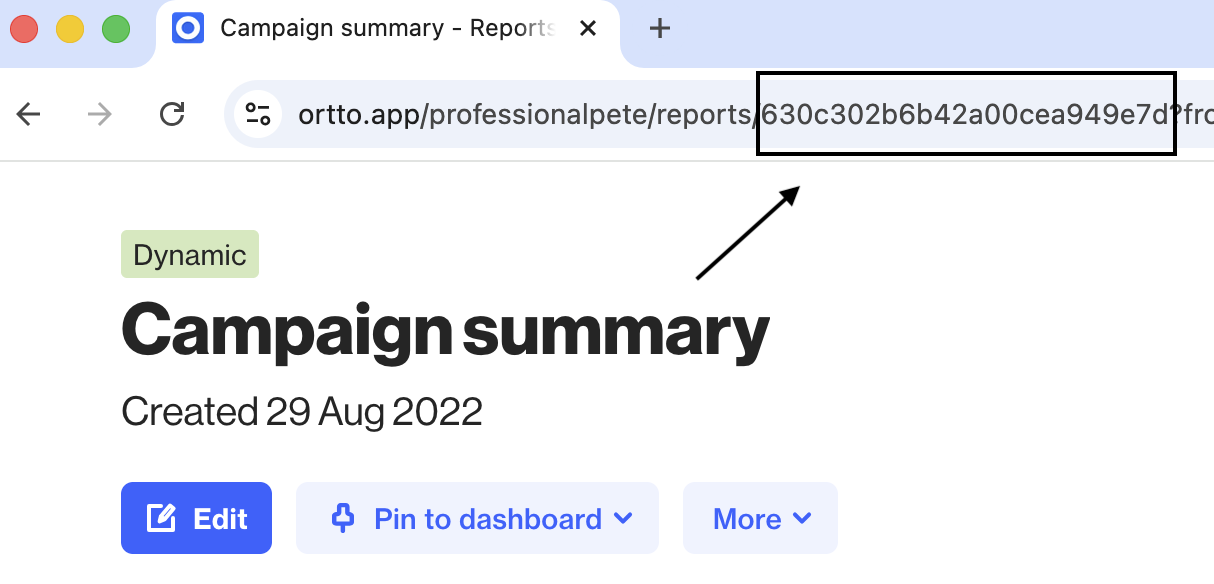
To find report ID(s) for the reports element, follow these steps:
- Navigate to Analytics > Reports.
- Click on the report you want to retrieve the ID for.
- Copy the article ID from the URL.
NOTE: You can also retrieve report IDs by using the reports list endpoint in retrieve a list of reports.