
Retrieve one or more people (get)
The get Ortto endpoint of the person entity is used to retrieve data from one or more person records in Ortto’s customer data platform (CDP).
This page provides descriptions of this endpoint’s:
- the response payload.
HTTP method and request resource
POST https://api.ap3api.com/v1/person/get
NOTE: Ortto customers who have their instance region set to Australia or Europe will need to use specific service endpoints relative to the region:
- Australia: https://api.au.ap3api.com/
- Europe: https://api.eu.ap3api.com/
For example: https://api.eu.ap3api.com/v1/<entity/endpoint>
All other Ortto users will use the default service endpoint (https://api.ap3api.com/).
Path and query parameters
This endpoint takes no additional path and/or query parameters.
Headers
This endpoint requires a custom API key and content type (application/json for the request body) in the header of the request:
X-Api-Key: CUSTOM-PRIVATE-API-KEYContent-Type: application/json
Request body
The request body consists of a JSON object whose valid elements are listed in the table below.
The following JSON object is an example of field and object data that Ortto can recognize to get data from one or more person records in your Ortto account’s CDP.
Example get people request body from Ortto’s CDP
json {
  "limit": 100,
  "sort_by_field_id": "str::last",
  "sort_order": "asc",
  "offset": 0,
  "fields": ["str::first", "str::last", "str::email", "str:cm:job-title"],
  "filter": {
    "$has_any_value": {
      "field_id": "str::first"
    }
  }
}
This endpoint also supports the use of AND/OR for filter conditions, as shown below for "$and" (AND).
Example get people request using $and to join filter conditions
json {
  "limit": 100,
  "sort_by_field_id": "str::last",
  "sort_order": "asc",
  "offset": 0,
  "fields": ["str::id", "str::last", "str::email"],
  "filter": {
    "$and": [
      {
        "$has_any_value": {
          "field_id": "str::last"
        }
      },
      {
        "$str::is": {
          "field_id": "str::email",
          "value": "contact@email.com"
        }
      }
    ]
  }
}
NOTE: The $has_any_value filter option will return results that have a value of 0 or "". Learn more about empty values.
The AND/OR conditions can also be nested. The following example shows a query for people who:
- AND
- Have the label "VIP" OR the label "Highly engaged".
Example get people request using nested AND/OR filter conditions
json {
  "limit": 100,
  "sort_by_field_id": "str::last",
  "sort_order": "asc",
  "offset": 0,
  "fields": ["str::id", "str::first", "str::last", "str::email"],
  "filter": {
    "$and": [
      {
        "$str::is": {
          "field_id": "geo::country",
          "value": "Australia"
        }
      },
      {
        "$or": [
          {
          "$str::is": {
            "field_id": "str:cm:label",
            "value": "VIP"
            }
          },
          {
          "$str::is": {
            "field_id": "str:cm:label",
            "value": "Highly engaged"
            }
          }
        ]
      }
    ]
  }
}
Generating filters using the browser's dev tools
Depending on the number of conditions, fields, or activities in your filter, creating it reliably can become complex. Fortunately, we have a trick that lets you copy an already created filter from the browser's dev tools. You can follow these steps if you're using Google Chrome. If you're using a different browser, you may need to adjust the steps accordingly.
Follow the steps below to do this:
- Open the browser's dev tools and select the Network tab.
- Create the filter in-app on the People page.
- Locate the create request and click on it.
- In the Preview tab, right-click on the filter and select either Copy value or Copy object.
- Paste the object into your API call.
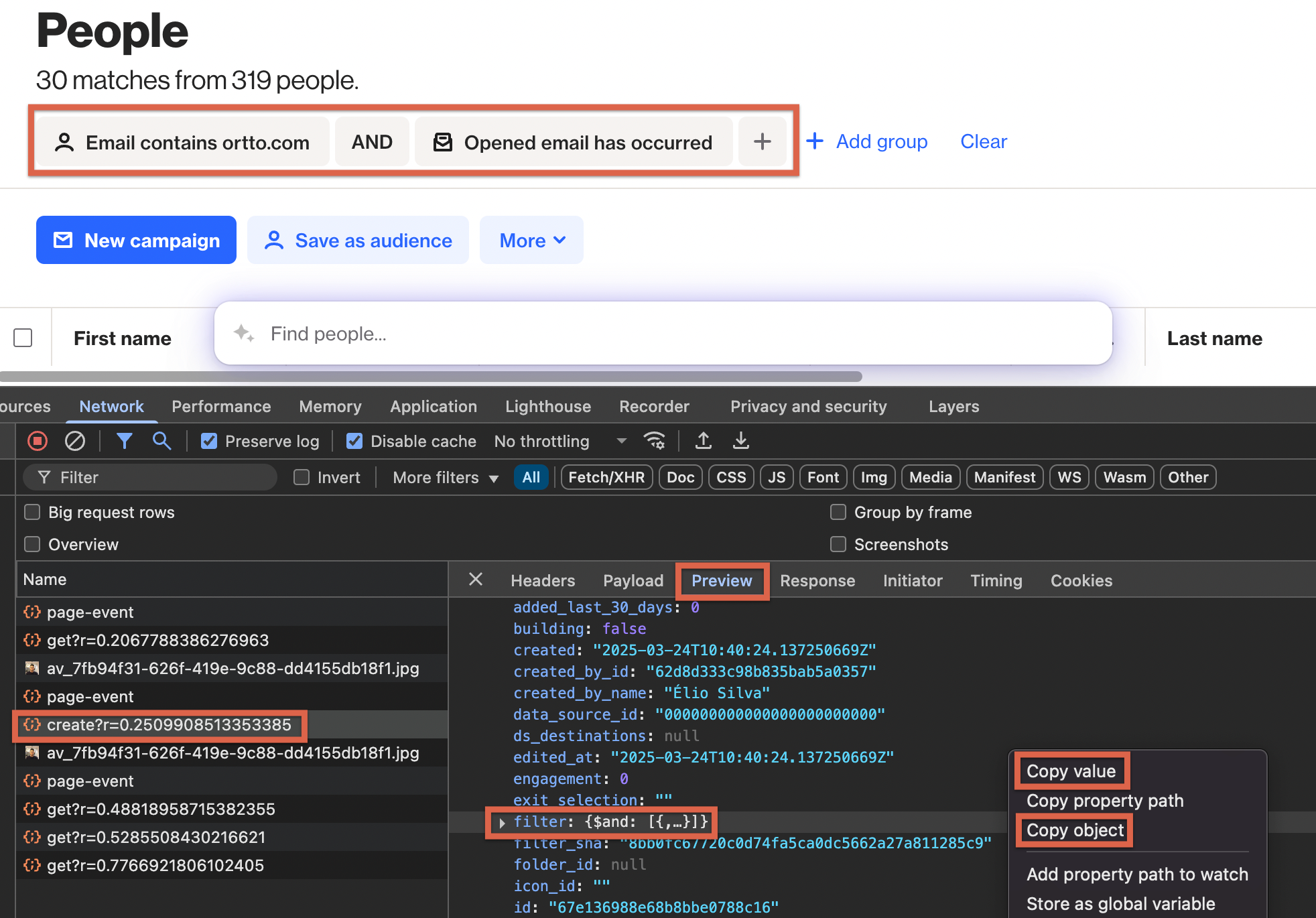
Example filter retrieved from the network tab
json {
    "$and": [
        {
            "$and": [
                {
                    "$str::contains": {
                        "label": "Email contains ortto.com",
                        "field_id": "str::email",
                        "timezone": "Italy",
                        "value": "ortto.com"
                    }
                },
                {
                    "$act::has_occurred": {
                        "formData": {
                            "mode": "hasOccurred",
                            "label": "Opened email has occurred",
                            "hasOccurred": {
                                "op": "$act::has_occurred",
                                "label": "has occurred"
                            }
                        },
                        "label": "Opened email has occurred",
                        "field_id": "act::o",
                        "timezone": "Italy",
                        "name": "Opened email",
                        "icon": "audience-newsletter-icon"
                    }
                }
            ]
        }
    ]
}
TIP: When copying the object from the network tab, some non-required fields (e.g. name, timezone, icon) may be included. You can exclude these to keep your API call cleaner, or send the call as is and it will still work.
Retrieve Contacts based on Contact ID
To retrieve Contact records based on their IDs, use the following endpoint
POST https://api.ap3api.com/v1/person/get-by-ids
Simply include the IDs of the Contacts you want to retrieve within the contact_ids parameter.
Example get people request body based on Contact ID
json {
  "contact_ids": ["0066cc4c16dfd264d0e99b00", "00668d816ce2d34c550fe300"],
  "fields": ["str::email"]
}
NOTE: You can include a maximum of 150 field IDs in your request.
Valid request body elements
The following table lists all valid request body elements (arrays, objects, or fields), which are available to this endpoint.
Element | Type | Description |
|---|---|---|
|
| The |
|
| The |
|
| The |
|
| The |
|
| The |
|
| The |
|
| The |
|
| The
If you are pairing To retrieve a list of archived contacts:
Or to use
|
| Object containing a person’s field_ID (representing a person field) used for filtering | The Therefore, a construct like:
where Similarly, the following construct would return people who do have their first name defined:
You can also join filter conditions with AND/OR. The following construct shows an example for using
|
→ |
| The |
→ |
| Use
|
Person fields
In Ortto, a person field:
- contains the data for a specific piece of information (i.e. field) about each person in Ortto’s CDP,
- is referenced via the Ortto API using a specific ID format, and
- could be a built in Ortto field or a custom field you have defined yourself (which also has its own ID format), and
- is returned by Ortto in the response, based on the
fieldsarray values submitted in the request to this endpoint.
Data about the following built-in person fields can be obtained through Ortto’s API when retrieving people from the CDP.
Field name (in product) | Field ID | Returns |
|---|---|---|
First name |
| A string whose value is this person’s first name. |
Last name |
| A string whose value is this person’s last name. |
Phone number |
| A phone number object of two members consisting of valid country code digits ( |
| A string whose value is this person’s email address. | |
City |
| A geographical data object consisting of a member |
Country |
| A geographical data object consisting of a member |
Birthday |
| A date object consisting of members |
Region |
| A geographical data object consisting of a member |
Postal |
| A string whose value is this person’s current postal code. |
Tags |
| An array whose string values are all tags currently specified on this person. |
Tag IDs |
| An array whose integer values are the internal Ortto ID of all tags currently specified on this person. |
GDPR |
| A boolean value where |
External ID |
| A string whose value is any ID used to uniquely identify this person. |
Email subscription permission |
| A boolean value where |
Context message for the email unsubscribe action |
| A string value representing the activity context message, when the email subscription permission was set to |
Context message for the email subscribe action |
| A string value representing the activity context message, when the email subscription permission was set to |
SMS subscription permission |
| A boolean value where |
Context message for the SMS subscribe action |
| A string value representing the activity context message, when the SMS subscription permission was set to |
Context message for the SMS unsubscribe action |
| A string value representing the activity context message, when the SMS subscription permission was set to |
Person field ID format
Each person field is referenced by an ID.
Since Ortto integrates with many third-party products, references to most person fields in Ortto’s CDP are both strongly-typed and namespace-specific. Therefore, for most person fields, the field’s ID is based on the format:
type:namespace:field-name
For:
- Ortto’s own built-in person fields, the
namespacevalue is unnecessary and is omitted. Hence, these built-in fields are referenced by an ID based on the format:type::field-name
- Data from custom fields can also be retrieved in person records from requests to this endpoint.The
field-namefor custom fields is typically based on their configured names converted to kebab-case.type:cm:field-name
Person field type abbreviations
The following person field type abbreviations are used to form the first part (type) of each person field’s ID for built-in fields:
Field type abbreviation | Type of value |
|---|---|
| Boolean |
| Date (object) |
| Geographical data (object) |
| Integer. For internal operations and calculations, the Ortto API treats decimal values as integers multiplied by 1,000. This is done to preserve the precision of values resulting from these calculations. |
| Phone number (object) |
| String |
Supported filters
The following table lists the available filter options that can be used to refine the contact records that are returned.
Element | Description |
|---|---|
| Filters for the first occurrence of a specified activity. |
| Filters records where a specified activity has not occurred. |
| Filters records where a specified activity has occurred. |
| Filters records based on the most recent occurrence of a specified activity. |
| Groups multiple conditions with an AND operator. |
| Filters records where a boolean field matches a specific value. |
| Filters records with a date/time field occurring after a specific value. |
| Filters records with a date/time field occurring before a specific value. |
| Filters records with a date/time field within a specific range. |
| Filters records with a date/time field exactly matching a specific value. |
| Filters records where the age is exactly a specified value. |
| Filters records where the age is less than a specified value. |
| Filters records where the age is greater than a specified value. |
| Filters records based on a recurring date or anniversary. |
| Filters records where a date field will occur within a specific range from the current time. |
| Filters records where a date field occurs in less than a specified time range. |
| Filters records where a date field occurs in more than a specified time range. |
| Filters records where a date field matches an exact relative time. |
| Filters records where a date field is less than a relative time. |
| Filters records where a date field is more than a relative time. |
| Filters records based on a geographic location match. |
| Filters records excluding a specific geographic location. |
| Filters records where a field has any value. |
| Filters records where a field has no value. |
| Filters records where an ID field matches a specific value. |
| Filters records where an ID field does not match a specific value. |
| Filters records where an ID field matches any value in a specific set of IDs. |
| Filters records where an ID field does not match any value in a specific set of IDs. |
| Filters records where an integer field is within a specific range. |
| Filters records where an integer field is greater than a specific value. |
| Filters records where an integer field matches a specific value. |
| Filters records where an integer field does not match a specific value. |
| Filters records where an integer field is less than a specific value. |
| Filters records where an integer field is outside a specific range. |
| Filters records for contacts that are members of a specified audience. |
| Filters records for contacts that are not members of a specified audience. |
| Filters records for contacts that are not subscribed to a specified audience. |
| Filters records for contacts that have opted-in communications. |
| Filters records for contacts that have not opted-in communications. |
| Filters records for contacts that opted-in to receive push notifications. |
| Filters records for contacts that are not opted-in for push notifications. |
| Filters records for contacts that are subscribed to a specified audience. |
| Groups multiple conditions with an OR operator. |
| Filters records where the phone number field is within specific ISO2 country codes. |
| Filters records where the phone number field matches a specific value. |
| Filters records where the phone number field does not match a specific value. |
| Filters records where the phone number field starts with a specific prefix. |
| Filters for records not in proximity to a specified Last Location |
| Filters records for proximity to a specified Last Location |
| Filters records where a string field is within a lexicographical range. |
| Filters records where a string field contains a specific value. |
| Filters records where a string field does not contain a specific value. |
| Filters records where a string field ends with a specific value. |
| Filters records where a string field is greater than a specific value. |
| Filters records where a string field matches a specific value. |
| Filters records where a string field does not match a specific value. |
| Filters records where a string field is less than a specific value. |
| Filters records where a string list contains a specific value. |
| Filters records where a string list contains fewer than a specific number of items. |
| Filters records where a string list contains more than a specific number of items. |
| Filters records where a string list does not contain a specific value. |
| Filters records where the first item in a string list contains a specific value. |
| Filters records where the first item in a string list does not contain a specific value. |
| Filters records where the first item in a string list matches a specific value. |
| Filters records where the first item in a string list does not match a specific value. |
| Filters records where a string list has exactly a specific number of items. |
| Filters records where the last item in a string list contains a specific value. |
| Filters records where the last item in a string list does not contain a specific value. |
| Filters records where the last item in a string list matches a specific value. |
| Filters records where the last item in a string list does not match a specific value. |
| Filters records where a string set contains a specific value. |
| Filters records where a string set contains any value from a specific set of values. |
| Filters records where a string set contains fewer than a specific number of items. |
| Filters records where a string set contains more than a specific number of items. |
| Filters records where a string set does not contain a specific value. |
| Filters records where the first item in a string set contains a specific value. |
| Filters records where the first item in a string set does not contain a specific value. |
| Filters records where the first item in a string set matches a specific value. |
| Filters records where the first item in a string set does not match a specific value. |
| Filters records where a string set has exactly a specific number of items. |
| Filters records where a string set matches a specific set of values. |
| Filters records where a string set does not match a specific set of values. |
| Filters records where the last item in a string set contains a specific value. |
| Filters records where the last item in a string set does not contain a specific value. |
| Filters records where the last item in a string set matches a specific value. |
| Filters records where the last item in a string set does not match a specific value. |
| Filters records where a string field starts with a specific value. |
| Filters records where a time and date field is after a specific absolute date. |
| Filters records where a time and date field is before a specific absolute date. |
| Filters records where a time and date field is between two specific absolute dates. |
| Filters records where a time and date field matches a specific absolute date. |
| Filters records where the age of a time and date field matches a specific value. |
| Filters records where the age of a time and date field is less than a specific value. |
| Filters records where the age of a time and date field is more than a specific value. |
| Filters records where a time and date field matches a specific anniversary. |
| Filters records where a time and date field occurs within a specific time range. |
| Filters records where a time and date field occurs within less than a specific time range. |
| Filters records where a time and date field occurs within more than a specific time range. |
| Filters records where a time and date field is exactly a specific relative duration. |
| Filters records where a time and date field is less than a specific relative duration. |
| Filters records where a time and date field is more than a specific relative duration. |
| Filters records where an object field contains a specific value. |
| Filters records where an object field does not contain a specific value. |
| Filters records for those that have started a specific campaign. |
| Filters records for those that are currently in a specific campaign. |
| Filters records for those that have exited a specific campaign. |
Response payload
The response payload consists of a JSON object whose elements are listed in the table below.
The following JSON object is an example of people’s data that Ortto retrieves from your Ortto account’s CDP after a request to this endpoint.
Example get people response payload from Ortto’s CDP
json {
   "contacts":[
      {
         "id":"0061b02b24f9b6f85dcb1e00",
         "fields":{
            "str::ei":"c533532fe5d16c7d4fa4c7f0",
            "str::email":"alex@example.com",
            "str::first":"Alex"
         }
      },
      {
         "id":"006153c064088217368efb00",
         "fields":{
            "str::email":"chris.hiedler@example.com",
            "str::first":"Chris",
            "str::last":"Hiedler"
         }
      },
      {
         "id":"006153c064088217368ef500",
         "fields":{
            "str::email":"alex.kodjo@example.com",
            "str::first":"Alex",
            "str::last":"Kodjo"
         }
      },
      {
         "id":"006153c064088217368ef800",
         "fields":{
            "str::email":"lana.romeijn@example.com",
            "str::first":"Lana",
            "str::last":"Romeijn"
         }
      },
      {
         "id":"0061b12ed91681ad2bbe4100",
         "fields":{
            "idt::o":"106153c398e0fdf2320c0700",
            "str::email":"chris.smith@example.com",
            "str::first":"Chris",
            "str::last":"Smith",
            "str:cm:job-title":"Technician"
         }
      }
   ],
   "meta":{
      "total_contacts":5,
      "total_accounts":0,
      "total_matches":5,
      "total_subscribers":5
   },
   "offset":0,
   "next_offset":5,
   "cursor_id":"0062299d655c7cf67184e1e0",
   "has_more":false
}
Response payload elements
The following table lists all elements (arrays, objects, or fields) in the response from a request to this endpoint.
Element | Description |
|---|---|
| An array of contacts with an id and a fields hash which contacts the list of fields you requested to be returned. Note that if a contact has an associated account it will include a idt::o field, which is the ID of the account with which this contact is associated. |
| A hash of meta data containing information about the matches to your contacts GET request, including:
|
| The offset which was set on this request. |
| The offset for fetching the next page of contacts. |
| When retrieving the next page of contacts, provide this cursor_id. |
| Whether or not there is a next page of contacts. |