
MMS
Overview
MMS allows users to include images and PDFs in their SMS campaigns. MMS is supported for Ortto's native SMS (via Twilio) as well as custom SMS providers including Twilio, Tall Bob, and Kudosity.
This article covers how to add media to an SMS message, associated costs, and key considerations around country and device support.
TIP: Because MMS is a subset of SMS, it follows the same guidelines when it comes to consent, best practices, and more. If you haven’t already, we recommend checking our SMS articles for further guidance.
MMS support by provider
MMS availability and fallback behaviour varies depending on which SMS provider is configured:
- Twilio (Ortto-native and custom): If the recipient's device or carrier does not support MMS, Ortto will automatically fall back to sending the text version of the message (as an SMS) - without the attached media file.
- Tall Bob and Kudosity: There is no automatic fallback. If the recipient's device or carrier does not support MMS, the message will not be delivered as MMS. In most cases this will result in the message not receiving a delivered status, rather than an explicit failure response.
Adding media to an SMS message
To add an image or PDF to an SMS message:
1. Create a new SMS asset/campaign, or edit an existing one.
2. Click + Add content > MMS.
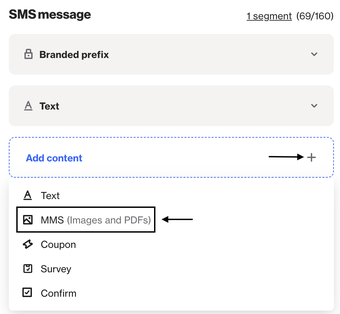
3. Select the image/PDF to include.
4. Save or continue building your message as normal.
Once media is attached, the message will be sent as MMS. If no media is attached, it will be sent as a standard SMS using the content in the Text component.
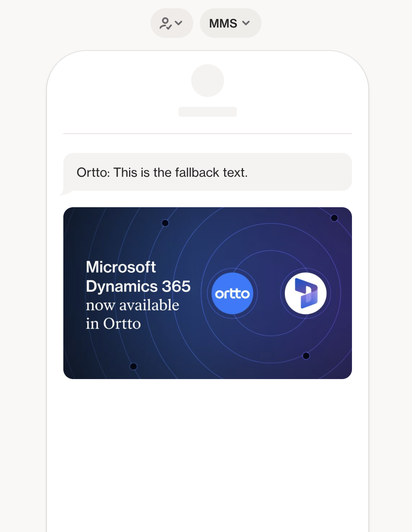
TIP: Since MMS is not always supported, we strongly encourage you to always include a Text component with fallback content in case the MMS does not render. As mentioned above, this only applies to our SMS feature or when using Twilio as your provider.
MMS costs
MMS messages are typically charged at a higher rate than standard SMS messages. Costs vary depending on the provider and the destination country.
For Ortto’s native MMS feature, pricing is outlined here.
For MMS sent via your own Twilio account, Tall Bob, or Kudosity, pricing is governed by your agreement with those providers. Please contact your provider directly for MMS-specific rates.
Country and device support
MMS support varies by country, carrier, and device. MMS is currently supported in Australia, Canada, and the United States.
Some carriers outside these regions may not support MMS at all, or may convert MMS messages to a different format. Device-level support also varies - older phones may not render MMS media correctly even if the carrier supports it.
IMPORTANT: Where MMS is not supported by the destination carrier, the message may not be delivered or may incur additional costs. Check with your provider before sending to international audiences.
Deliverability and reporting
MMS deliverability is less straightforward than SMS. Because delivery confirmation depends on carrier reporting, users will not always receive a definitive delivered status for MMS messages.
- Twillio: Delivery receipts are available where supported by the carrier, but are not guaranteed for all destinations.
- Tall Bob and Kudosity: The absence of a delivered activity in Ortto does not necessarily mean the message failed - it may simply mean that delivery confirmation was not returned by the carrier.
When reviewing campaign or journey reports, you should be aware that MMS delivery rates may appear lower than SMS rates, even when messages were successfully received. Ortto will surface delivery data where it is available from the provider.